
Viewing Hourly Rates
Yes, you can easily view a list of available Remote Team Members and their hourly rates simultaneously through the marketplace.
How to View Hourly Rates- Navigate to the candidate search tab in your Company dashboard.
- Browse the list of Remote Team Member profiles; their hourly rates are clearly displayed on their individual profile cards in the search results.
- To narrow your search, use the Hourly Rate filter to specify a range that fits your budget.
💡 Tip: This allows you to compare multiple Remote Team Members quickly and find the best fit for your Company's needs!
Hourly Rate Profile View
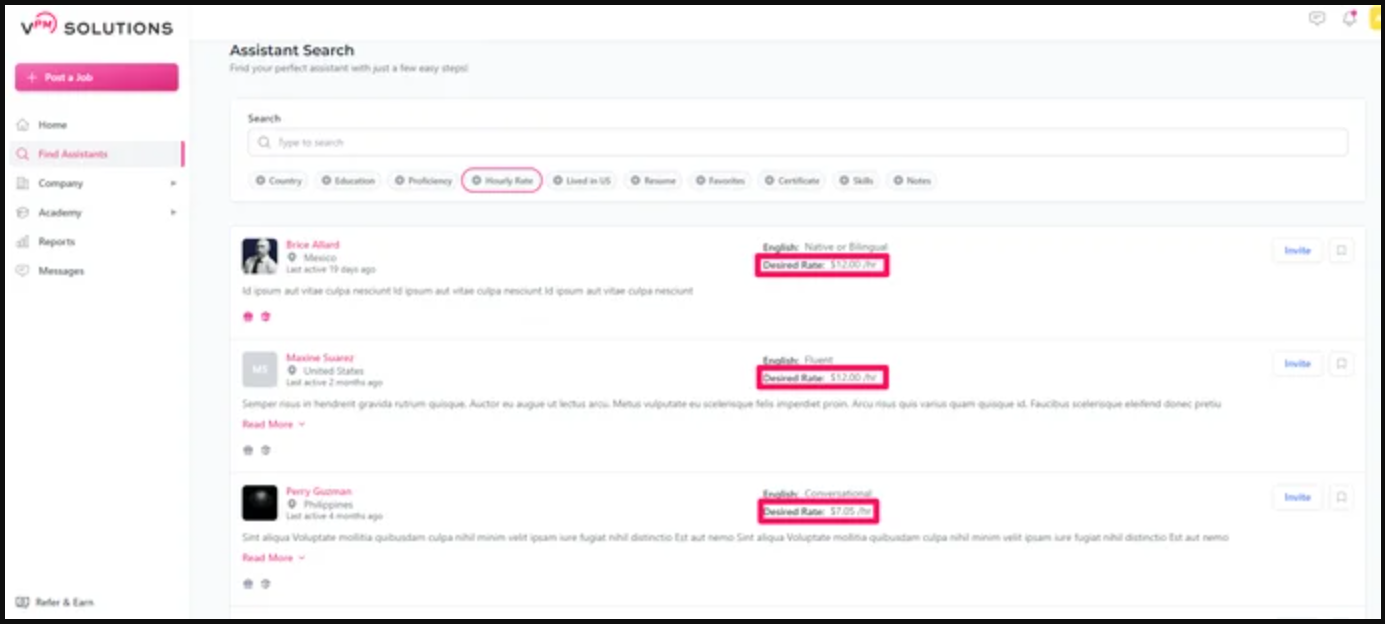
Use the reference image below to see where the hourly rate is located on a candidate's profile card:
Related Resources
Review these verified resources to effectively manage and connect with your team:
How to Manage Your Remote Team Member: Weekly Meetings & Success Best Practices For Training Your Remote Team Member Can I Invite a Remote Team Member to Company Accounts? How to Give a Remote Team Member a Pay Raise
Contact Support
If you have any questions or are in need of assistance, please submit a ticket via our support channel.
Submit a Ticket