
Communication on VPM Solutions is simple and direct. Your Company can initiate contact with talent to discuss opportunities and move forward with the hiring process.
When can I message a candidate?- If they applied to your job: Messaging is automatically enabled. You can open their application and start the conversation immediately.
- If you invited them: You can message invited Remote Team Members (RTMs) even before they have officially applied. This allows you to answer questions and encourage them to complete the application process.
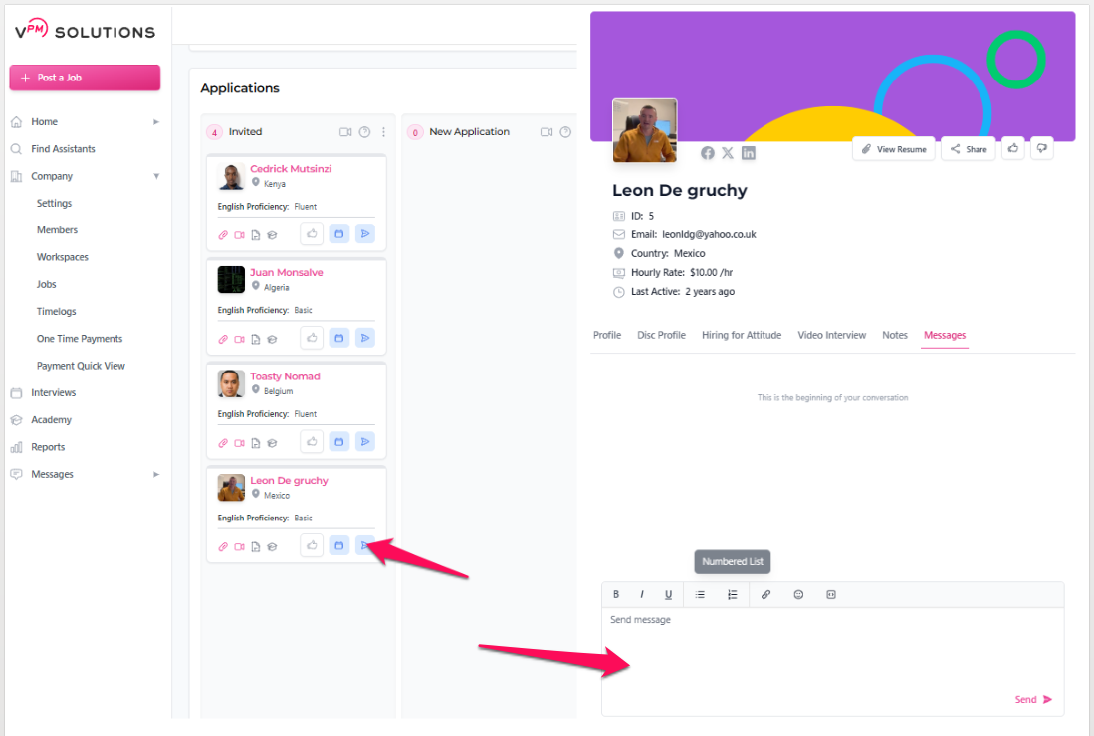
- Go to the Jobs tab and select the job posting you are working on.
- Navigate to either the Applicants or Invited tab.
- Locate the RTM and click the Message Icon.
- Type your message and send.
⚠️ Important Reminder: The Company must always send the first message. Candidates cannot contact you until you have initiated the conversation.
Review these verified resources for Messaging:
If you have any further questions or need additional assistance please don't hesitate to reach out to our team.
Submit a Ticket