
How Do I review Upcoming Payroll
Description: This article explains how companies can review and approve payroll reports on VPM Solutions before they are automatically processed.
When payroll is generated for your assistants, you will receive an email reminder with the upcoming payroll amount and a direct link to review your reports.
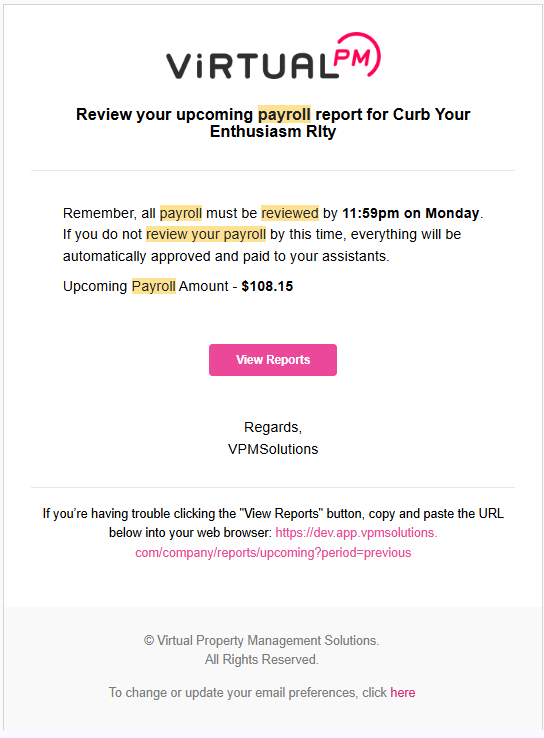 1. Payroll Review Deadline
- All payroll must be reviewed by 11:59 PM on Monday.
- If payroll is not reviewed by this deadline, the system will automatically approve and pay your assistants.
2. Upcoming Payroll Email
You will receive an email notification with:
- Company name
- Total payroll amount for the period
- A "View Reports" button linking to your detailed payroll report.
3. Weekly Timelog Report
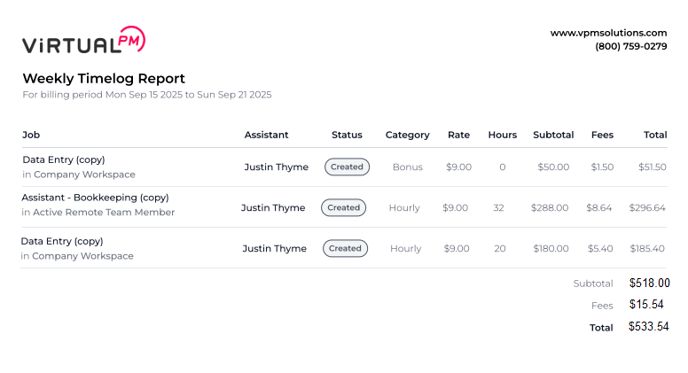
Your Weekly Timelog Report provides a breakdown of your assistants' logged hours and associated fees:
- Job & Assistant – Role and name of the assistant.
- Status – Indicates payroll entry (e.g., "Created").
- Category – Hourly or Bonus.
- Rate – Agreed hourly rate.
- Hours – Total hours logged.
- Subtotal – Total earnings before fees.
- Fees – VPM platform fee applied.
- Total – Final amount charged (Subtotal + Fees).
💡 Tip: Bonus vs Hourly
- Bonus – A one-time payment manually added by the company.
- Hourly – Timelogs entered by the Remote Team Member and automatically processed through the system.
Contact Us
If you have any further questions or need additional assistance reviewing your payroll, please don't hesitate to reach out to our team.
Contact Support