
Posting a job is just the beginning of the hiring process. To attract more applicants and encourage top-tier Remote Team Members to apply, consider the following strategies to enhance your Company profile:
1. Comprehensive 'About' SectionProvide detailed information about your Company to make it feel more authentic and appealing. Include:
- Company History: Share your journey, current status, and future goals.
- Core Values: Highlight the principles that define your Company culture.
- Operational Scope: Offer insights into your size, location, and areas serviced.
- Vision & Mission: Communicate your purpose and aspirations.
- Philosophy on Remote Team Members: Express your approach to integrating Remote Team Members into your internal team.
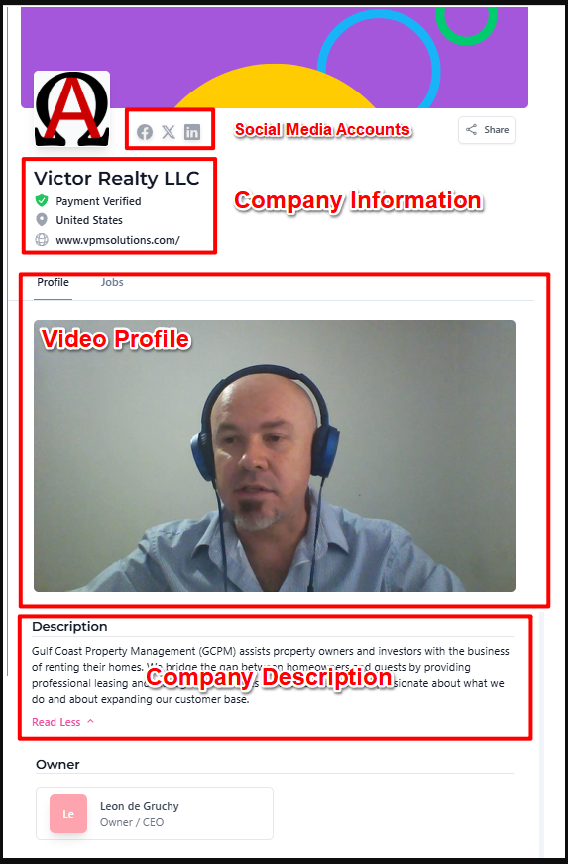
Include links to your website and social profiles. This online presence reassures applicants of your Company legitimacy and allows them to learn more about your brand before they apply.
Create a short video (around 1 minute) introducing your Company. Covering topics like your history, mission, and philosophy on Remote Team Members adds a personal touch and humanizes your brand to potential applicants.
Use the reference image below to locate your Company Info settings within your dashboard:
Review these verified resources to help build a strong Company profile:
Getting Your Company Profile Setup How to Edit Your Company Account How to Upload a Video as a Company How to Add Your Social Media Accounts Why Should I Add Web and Social Media?If you have any questions or are in need of assistance, please submit a ticket via our support channel.
Submit a Ticket