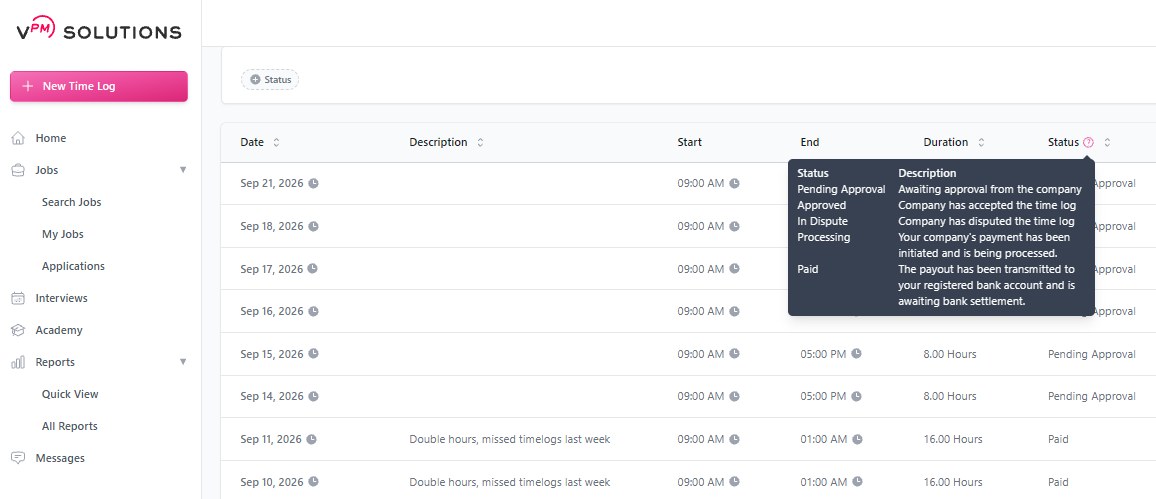
Tracking the status of your earnings is essential for every Remote Team Member (RTM) and Company. Your dashboard provides real-time updates as your time logs move from submission to bank deposit.
Payment Status Definitions
Pending Approval: The time log has been submitted for review.
Approved: The Company has manually accepted the time log, and it is scheduled for the next payment cycle.
In Dispute: The Company has raised a question or concern regarding the log. No payment will process until the dispute is resolved.
Processing: Your company's payment has been initiated and is being processed.
Paid: The payout has been transmitted to your registered bank account and is awaiting bank settlement / clearing.
💡 Pro Tip: Most payments move from "Processing" to "Paid" within 3-5 business days, depending on your local banking institution's processing times.
💡 Pro Tip: Timelogs will remain in Pending Approval status until processed, unless manually approved, declined, or disputed. Companies are not required to manually approve hours—unless timelogs are actively declined or disputed, they will automatically process for payment even if they still show as Pending Approval.
Use these verified resources for more information on payments and timelines: